
Web navigation
The Feldy web application is designed for the front-office team to manage projects, review field captures, prepare estimates, organize pipelines, and coordinate work across the company. Information captured in the mobile app syncs to the web application. This allows field representatives to document the jobsite while estimators, managers, and office staff continue the project from a larger workspace. Because Feldy adapts to your organization’s trades and permissions, some navigation items may not appear for every user.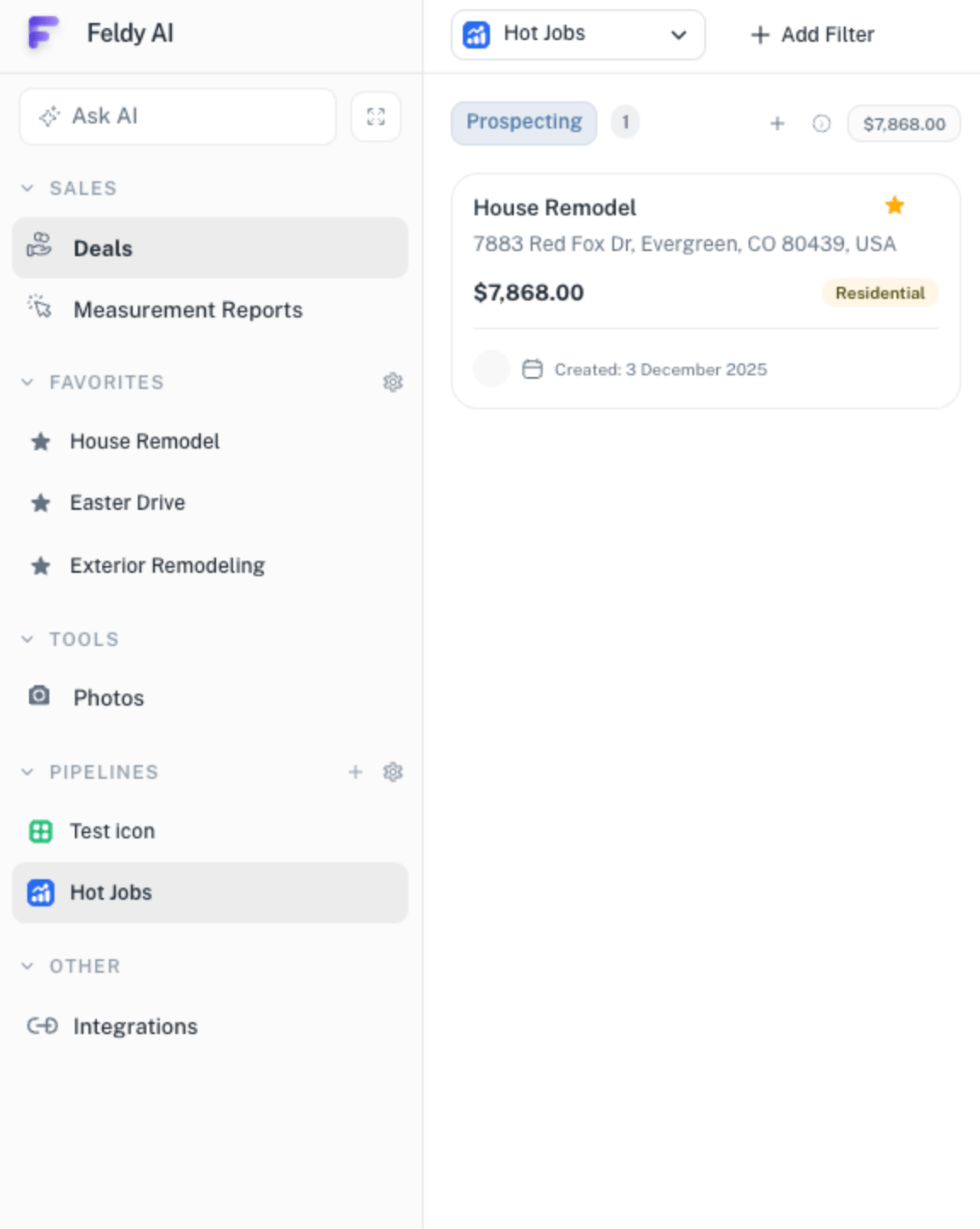
Web workspace
The main navigation appears on the left side of the application. Depending on your organization and role, it may include:- Ask AI
- Projects
- Measurement Reports
- Favorites
- Photos
- Pipelines
- Integrations
Some versions of Feldy currently display Deals. This area is being renamed Projects. Both names refer to the workspace where information for a specific property and job is stored.
Ask AI
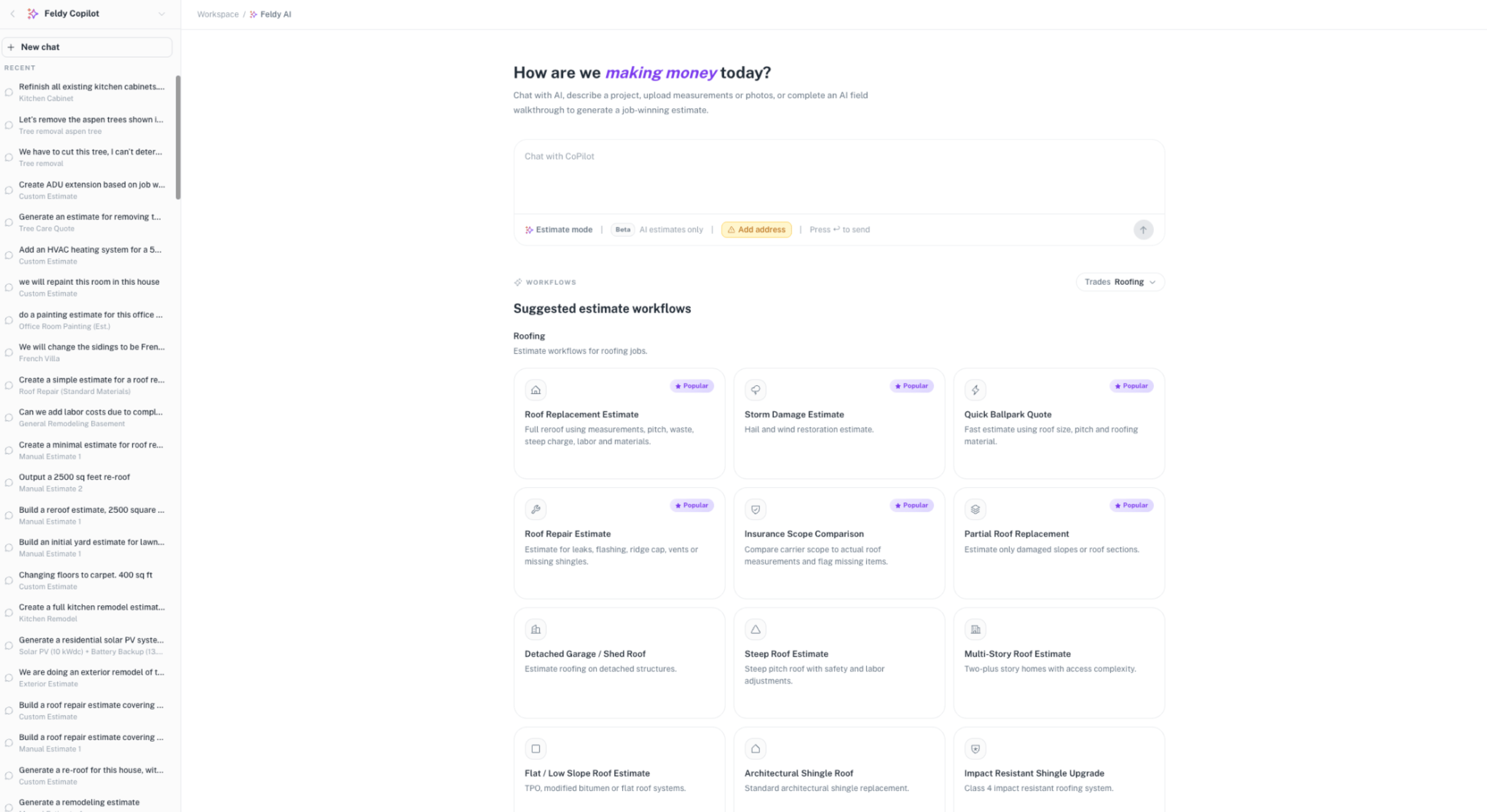
Ask AI is the central hub for Feldy’s AI tools. From here, you can describe work, provide project information, and ask Feldy to create an estimate. You can also review previous AI conversations created by members of your organization. The Ask AI workspace contains:- A conversational prompt field
- Estimate mode
- Property-address context
- Suggested estimate workflows
- Trade-specific workflow recommendations
- Your organization’s recent AI conversations
Start a new AI conversation
Select Ask AI, then describe what you need. For example:Create an estimate to replace the roof on a two-story residential property. Include tear-off, disposal, synthetic underlayment, architectural shingles, flashing, ridge ventilation, labor, and cleanup.You can also provide supporting project information such as:
- A property address
- Jobsite photos
- Measurement reports
- Documents
- AI job walkthroughs
- Written scope details
Suggested estimate workflows
The Ask AI page shows suggested workflows based on the trades selected for your organization. For a roofing organization, suggested workflows may include:- Roof replacement estimate
- Storm-damage estimate
- Quick ballpark quote
- Roof repair estimate
- Insurance scope comparison
- Partial roof replacement
- Detached garage or shed roof
- Steep-roof estimate
- Multi-story roof estimate
- Flat or low-slope roof estimate
- Architectural shingle roof
- Impact-resistant shingle upgrade
AI conversation history
The left side of the Ask AI workspace lists recent conversations created by your team. Conversation titles are generated from the work being discussed, such as:- Kitchen cabinet refinishing
- Tree removal
- Roof replacement
- Flooring installation
- Exterior remodeling
- HVAC installation
Projects
Projects are the central record for work associated with a property. Each project can contain:- Property and customer information
- Jobsite photos and videos
- AI walkthroughs
- Notes and comments
- Measurement reports
- 3D property models
- Estimates
- Pricing options
- Proposals
- Documents
- Assigned team members
- Project-stage information
Project board
Projects can be displayed in a board organized by project stage. For example, a board may contain stages such as:- Prospecting
- Lead
- Inspection scheduled
- Estimating
- Proposal sent
- Won
- Lost
- Project name
- Property address
- Current value
- Property type
- Creation date
- Favorite status
Filters
Use Add Filter to narrow the projects displayed on the board. Depending on your organization’s configuration, you may be able to filter by:- Assigned user
- Project stage
- Property type
- Trade
- Creation date
- Project value
- Labels
- Other project fields
Measurement Reports
Roofing and other eligible exterior organizations may see Measurement Reports in the web navigation. This section contains measurement orders created across the organization. Use it to:- Review submitted orders
- Track pending reports
- Open completed reports
- View connected 3D property models
- Return to the associated project
- Review who requested each report
- Confirm request and completion dates
Trade-specific report access
For roofing organizations, Measurement Reports may include roof diagrams, pitches, areas, edges, penetrations, and related property information. For supported exterior organizations, this section may contain exterior measurement products and their associated 3D models. Future interior 3D scanning workflows may also produce reports that appear here when those features become available.Favorites
The Favorites section gives you fast access to projects marked with a star. Use Favorites for:- Active projects
- High-value opportunities
- Projects requiring frequent review
- Jobs waiting for customer decisions
- Projects managed by a specific team
Photos
The Photos section provides a centralized library of jobsite captures from across the organization. Use it to review photos without opening each project individually. Photos remain connected to their original project and can be used as sources for:- AI estimates
- AI job walkthroughs
- Measurement reports
- Inspection documentation
- Scope development
- Customer-facing proposals
- Internal review
Pipelines
Pipelines are available in the web application and are not currently supported in the mobile app. A pipeline is a project-specific Kanban board that allows your team to organize projects into stages. Each pipeline can represent a different company workflow. For example, a roofing company may create:- Residential Sales
- Insurance Claims
- Commercial Roofing
- Production
- Hot Jobs
- New Leads
- Design
- Estimating
- Proposal Review
- Scheduled
- In Progress
- Completed
Work with a pipeline
Inside a pipeline, projects are grouped into columns representing stages. Your team can use the board to:- See where each project stands
- Move projects between stages
- Track project value
- Focus on high-priority work
- Separate workflows by department or service
- Create custom views for different teams
Create and configure pipelines
Users with the appropriate permissions can create additional pipelines and define the stages used within them. This allows Feldy to reflect how your company actually moves work through sales, estimating, production, and completion rather than forcing every team into one standard workflow.Integrations
The Integrations section is visible only to users with administrative access. Admins can use this area to connect Feldy with supported external systems. Integrations may be used to synchronize or exchange information such as:- Projects
- Customers
- Photos
- Measurements
- Estimates
- Documents
- Workflow updates
Mobile and web responsibilities
The mobile and web applications work from the same project information, but they are designed for different parts of the workflow.Mobile application
The mobile app is optimized for field activity, including:- Creating projects at the property
- Taking photos
- Capturing jobsite conditions
- Starting AI walkthroughs
- Ordering measurement reports
- Reviewing reports in the field
- Starting estimates
Web application
The web application is optimized for office and management activity, including:- Managing project boards
- Reviewing field captures
- Working with AI conversations
- Editing detailed estimates
- Preparing proposals
- Managing pipelines
- Reviewing reports and 3D models
- Configuring users, pricing, and templates
- Managing integrations