> ## Documentation Index
> Fetch the complete documentation index at: https://docs.feldy.ai/llms.txt
> Use this file to discover all available pages before exploring further.
# Welcome to Feldy
Feldy is field-first AI software that helps service professionals capture, understand, and price physical work.
Photos, videos, voice notes, walkthroughs and measurements from the jobsite become structured information your team can use to create estimates, proposals, job completion reports, measurement reports and other project documentation.
Whether you work in roofing, painting, cleaning, landscaping, flooring, tree care or another field-service trade, Feldy helps reduce the work that normally happens after leaving the jobsite.
 ## What you can do with Feldy
With Feldy, you can:
* Create and organize customer projects
* Capture photos, videos and jobsite walkthroughs
* Perform 3D physical captures of real-world spaces, including interior house scans, exterior building captures, and roof measurements
* Use AI to generate design ideas, layout suggestions, and visual concepts based on captured spaces
* Add notes and instructions using your voice
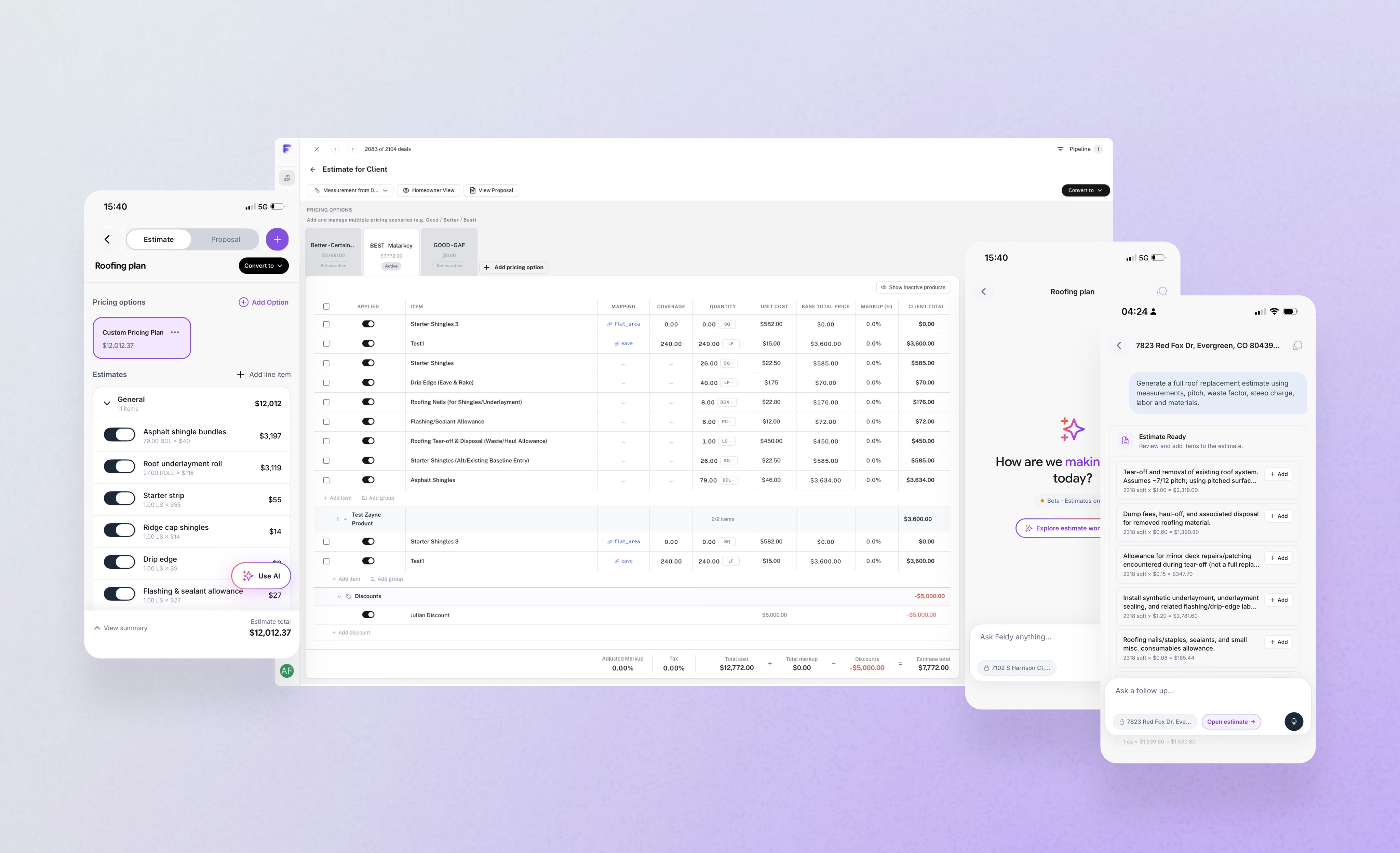
* Generate estimates from jobsite information
* Create project documents and reports
* Collaborate with your office and field teams
* Keep job information connected from the first visit through the completed work
## How Feldy works
A typical Feldy workflow has four steps:
### 1. Create a project
Start by entering the property address and customer information. The project becomes the central place for everything related to the job.
### 2. Capture the work
Use the Feldy mobile app to take photos, record videos, speak notes, or complete a guided walkthrough of the property.
You can capture only what is relevant to the work you are quoting.
### 3. Let Feldy understand the job
Feldy uses AI to analyze the captured information, identify important details and organize the jobsite data.
You can also provide direct instructions, such as:
> Replace the damaged siding on the rear elevation and repaint the repaired area to match the existing finish.
### 4. Generate an artifact
Turn the captured information into the output you need, including:
* Estimates
* Proposals
* Measurement reports
* Scopes of work
* Inspection summaries
* Customer-facing documentation
* Internal project notes
Review the result, make any necessary changes and share it with your customer or team.
## Who Feldy is for
Feldy is designed for home service companies and trades that inspect physical spaces, document work, and produce estimates or reports.
This includes a wide range of field-service and construction-related professionals and organizations, such as:
* Home service companies managing residential repair, maintenance, and improvement work
* Roofing contractors handling inspections, repairs, replacements, and storm restoration projects
* Painting contractors working on interior and exterior residential or commercial painting jobs
* Landscaping companies providing design, installation, maintenance, and seasonal services
* Cleaning services performing residential, commercial, post-construction, and specialty cleaning work
* Flooring installers handling hardwood, laminate, vinyl, tile, and carpet installation and repair
* General contractors coordinating multi-trade construction, renovation, and remodeling projects
* Restoration and remediation companies dealing with water, fire, mold, and disaster recovery work
* HVAC contractors managing heating, cooling, ventilation, and system maintenance services
* Electrical contractors performing residential, commercial, and industrial electrical installations and repairs
* Plumbing contractors handling installations, repairs, and system maintenance for water and drainage systems
* Exterior contractors working on siding, windows, doors, gutters, and envelope improvements
* Specialty trade contractors such as insulation, drywall, masonry, and concrete professionals
As well as the individuals and roles who operate within these organizations, including:
* Owner-operators running small or independent service businesses
* Sales representatives responsible for conducting site visits and preparing estimates
* Estimators who translate jobsite conditions into accurate pricing and scopes of work
* Project managers overseeing scheduling, execution, and client communication
* Field technicians capturing jobsite data and performing on-site work
* Office administrators managing documentation, scheduling, and customer coordination
* Operations teams coordinating workflows, resources, and overall business performance
You can use Feldy independently or invite your entire team into the same organization.
## Use Feldy in the field and office
Feldy is available through both the mobile app and web application.
### Mobile app
Download the Feldy iOS app: [https://apps.apple.com/us/app/feldy-ai/id6780327228](https://apps.apple.com/us/app/feldy-ai/id6780327228)
Feldy is fully optimized for iPhone and iPad. Many users prefer iPad for on-site viewing, walkthroughs, and capturing larger jobsite details.
#### What you can do in the mobile app
At the jobsite, the mobile app helps you capture and organize everything in real time:
* **Create projects** – Start a new job directly from the field
* **Capture exterior** – Photograph and document the outside of the property, including elevations, roof, and site conditions
* **Capture interior** – Record rooms, damage, measurements, and interior conditions for complete job coverage
* **Record walkthroughs** – Document the property step-by-step
* **Add voice instructions** – Speak notes and job details hands-free
* **Review project information** – Access existing job data on-site
* **Start estimates and reports** – Begin generating documents immediately from captured data
### Web application
Use the web application to:
* Review jobsite captures (photos, videos, walkthroughs, and measurements collected in the field)
* Create and edit estimates with a full optimized sales experience
* Build and manage your pricebook, including labor, materials, and service pricing
* Set up and maintain sales templates for consistent proposals and scopes of work
* Configure and manage your AI knowledge base to improve estimation and recommendations
* Generate customer-facing documents such as estimates, proposals, and reports
* Invite and manage team members across your organization
* Configure your organization settings, branding, and workflows
* Manage projects across your company from start to finish
The web application is designed for office and sales workflows. It is the central place for setup, pricing, sales operations, and AI configuration.
Information captured in the field is synchronized with the project so your office and field teams can work from the same information.
## Get started with Feldy
Ready to begin? Create your account, set up your organization, and complete your first project.
[Create your Feldy account →](https://app.feldy.ai/auth/jwt/login/)
Ready to make this your own? Start by editing this page. Update your `docs.json` file to customize your site. Then fill out the [Quickstart](/quickstart) page.
This card links to the quickstart page in your project.
Add cards, callouts, steps, tabs, and more to design and structure your pages.
Set your site name, branding, and navigation in the `docs.json` file.
## What you can do with Feldy
With Feldy, you can:
* Create and organize customer projects
* Capture photos, videos and jobsite walkthroughs
* Perform 3D physical captures of real-world spaces, including interior house scans, exterior building captures, and roof measurements
* Use AI to generate design ideas, layout suggestions, and visual concepts based on captured spaces
* Add notes and instructions using your voice
* Generate estimates from jobsite information
* Create project documents and reports
* Collaborate with your office and field teams
* Keep job information connected from the first visit through the completed work
## How Feldy works
A typical Feldy workflow has four steps:
### 1. Create a project
Start by entering the property address and customer information. The project becomes the central place for everything related to the job.
### 2. Capture the work
Use the Feldy mobile app to take photos, record videos, speak notes, or complete a guided walkthrough of the property.
You can capture only what is relevant to the work you are quoting.
### 3. Let Feldy understand the job
Feldy uses AI to analyze the captured information, identify important details and organize the jobsite data.
You can also provide direct instructions, such as:
> Replace the damaged siding on the rear elevation and repaint the repaired area to match the existing finish.
### 4. Generate an artifact
Turn the captured information into the output you need, including:
* Estimates
* Proposals
* Measurement reports
* Scopes of work
* Inspection summaries
* Customer-facing documentation
* Internal project notes
Review the result, make any necessary changes and share it with your customer or team.
## Who Feldy is for
Feldy is designed for home service companies and trades that inspect physical spaces, document work, and produce estimates or reports.
This includes a wide range of field-service and construction-related professionals and organizations, such as:
* Home service companies managing residential repair, maintenance, and improvement work
* Roofing contractors handling inspections, repairs, replacements, and storm restoration projects
* Painting contractors working on interior and exterior residential or commercial painting jobs
* Landscaping companies providing design, installation, maintenance, and seasonal services
* Cleaning services performing residential, commercial, post-construction, and specialty cleaning work
* Flooring installers handling hardwood, laminate, vinyl, tile, and carpet installation and repair
* General contractors coordinating multi-trade construction, renovation, and remodeling projects
* Restoration and remediation companies dealing with water, fire, mold, and disaster recovery work
* HVAC contractors managing heating, cooling, ventilation, and system maintenance services
* Electrical contractors performing residential, commercial, and industrial electrical installations and repairs
* Plumbing contractors handling installations, repairs, and system maintenance for water and drainage systems
* Exterior contractors working on siding, windows, doors, gutters, and envelope improvements
* Specialty trade contractors such as insulation, drywall, masonry, and concrete professionals
As well as the individuals and roles who operate within these organizations, including:
* Owner-operators running small or independent service businesses
* Sales representatives responsible for conducting site visits and preparing estimates
* Estimators who translate jobsite conditions into accurate pricing and scopes of work
* Project managers overseeing scheduling, execution, and client communication
* Field technicians capturing jobsite data and performing on-site work
* Office administrators managing documentation, scheduling, and customer coordination
* Operations teams coordinating workflows, resources, and overall business performance
You can use Feldy independently or invite your entire team into the same organization.
## Use Feldy in the field and office
Feldy is available through both the mobile app and web application.
### Mobile app
Download the Feldy iOS app: [https://apps.apple.com/us/app/feldy-ai/id6780327228](https://apps.apple.com/us/app/feldy-ai/id6780327228)
Feldy is fully optimized for iPhone and iPad. Many users prefer iPad for on-site viewing, walkthroughs, and capturing larger jobsite details.
#### What you can do in the mobile app
At the jobsite, the mobile app helps you capture and organize everything in real time:
* **Create projects** – Start a new job directly from the field
* **Capture exterior** – Photograph and document the outside of the property, including elevations, roof, and site conditions
* **Capture interior** – Record rooms, damage, measurements, and interior conditions for complete job coverage
* **Record walkthroughs** – Document the property step-by-step
* **Add voice instructions** – Speak notes and job details hands-free
* **Review project information** – Access existing job data on-site
* **Start estimates and reports** – Begin generating documents immediately from captured data
### Web application
Use the web application to:
* Review jobsite captures (photos, videos, walkthroughs, and measurements collected in the field)
* Create and edit estimates with a full optimized sales experience
* Build and manage your pricebook, including labor, materials, and service pricing
* Set up and maintain sales templates for consistent proposals and scopes of work
* Configure and manage your AI knowledge base to improve estimation and recommendations
* Generate customer-facing documents such as estimates, proposals, and reports
* Invite and manage team members across your organization
* Configure your organization settings, branding, and workflows
* Manage projects across your company from start to finish
The web application is designed for office and sales workflows. It is the central place for setup, pricing, sales operations, and AI configuration.
Information captured in the field is synchronized with the project so your office and field teams can work from the same information.
## Get started with Feldy
Ready to begin? Create your account, set up your organization, and complete your first project.
[Create your Feldy account →](https://app.feldy.ai/auth/jwt/login/)
Ready to make this your own? Start by editing this page. Update your `docs.json` file to customize your site. Then fill out the [Quickstart](/quickstart) page.
This card links to the quickstart page in your project.
Add cards, callouts, steps, tabs, and more to design and structure your pages.
Set your site name, branding, and navigation in the `docs.json` file.